
Marionette Theatre, back in 3D
How can we bring the Marionette Paper Theatre back into the 3-dimensional space? What can be experienced in this theatre?


1. Starting point
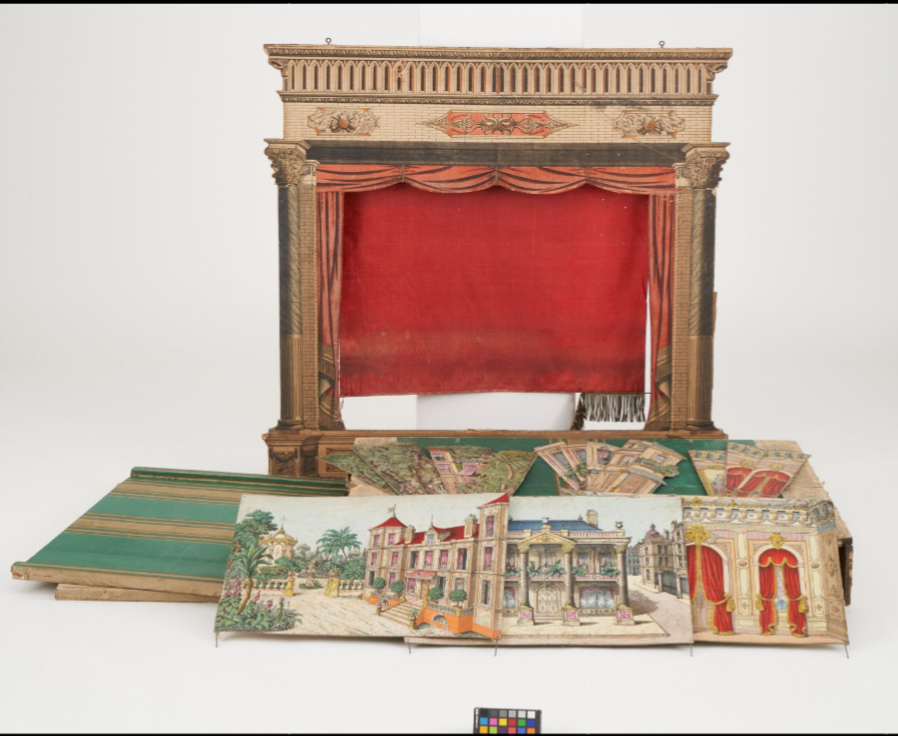
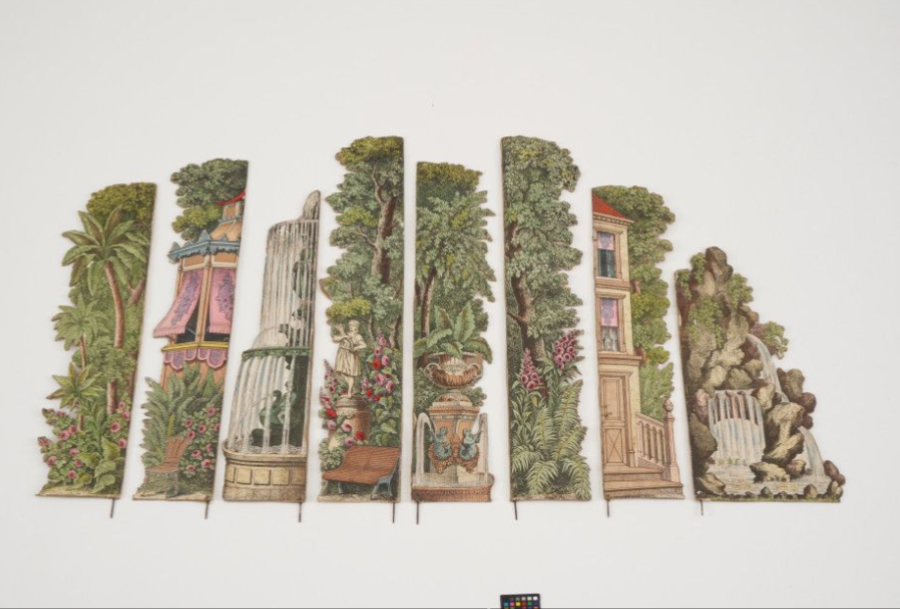
The SKKG collection holds beautifully illustrated paper sheets that fold into a 3D puppet theatre stage, plus marionettes and small figures and stage objects. In the digital collection all of this exists only as photographs, so the theatre is flat again.
The pitch asked: How can we bring the Marionette Paper Theatre back into three-dimensional space, and what can people experience in it?
The pitch suggested several directions, such as a VR walk-through, an AR stage on a table, a build-it-yourself kit or a printable PDF. The final format was left open for the team to decide.
What the team decided: An interactive 3D theatre in the browser. The visitor picks a play and sets up the stage with painted backdrops and stage objects digitised from the SKKG collection. Objects from other collections can be added through IIIF Manifests. The visitor then plays a rigged SKKG marionette with their hand in front of the web 9-string control cross.
2. Data:
The objects existed only as one or two photos from the SKKG digital collection (CC0). Each was rebuilt as a textured 3D model with Blender scripts and image processing (Python, OpenCV). The exact method depends on the object's shape.
Limits of the 3D models:
- Sides not visible in any photo are plausibly completed, not documented: they are filled from the opposite side, a symmetric counterpart or a mirrored copy.
- Remnants of the photo background are retouched out.
- Fine relief such as needles, fingers or carving marks is mostly texture, not geometry.
- Large parts of the code, the Blender scripts and the 3D models were made with an AI coding assistant (Claude Code), guided and checked by the team. Each model was reimported, rendered and compared with the photo after every change.
Objects from SKKG:
- Stage: Theaterbühne 30717.1
- Sign: Schild 45567.3
- Marionette: Marionettenpuppe 46154
- Chest: Truhe 46955
- Chair: Stuhl 25210.6
- Ball: Kanonekugel 38896.3
- Bed: Bett 44012
- Cup: Becher 48468.21
- Tree: Nadelbaum 29319.27
- Cat: Katze «Villa Poupée» 29404.202
- Frog: 1 Paar Tierfiguren; Frosch 49790
- Dog: Krippenfigur Hund 38872.24
Furthermore, a 3D model of a microscope from the collection of ETH Library can be included via a IIIF manifest into the scene.
- Microscope: Mikroskop ETHZ GEOB 0055
- IIIF Manifest:IIIF Manifest
3. Results:
| Area | Result |
|---|---|
| Web application | Browser app (TypeScript, Vite, Meta IWSDK, three.js, Rapier physics, MediaPipe). It opens with a stage curtain and play signs. The the marionette is played with one or two hands in front of the webcam. Impro mode lets the visitor set the stage and save scenes as a play. |
| Plays | Plays are lists of scenes (backdrop and stage objects). |
| Stage | 3D stage with side walls, main curtain, painted backdrops, play signs, a velvet wall and a parquet floor. Lighting rig designed with a theatre lighting expert, with a light desk and four lighting moods, plus follow spots that track each puppet. |
| Marionette | A procedural, rigged, cloth-ready model of SKKG Marionettenpuppe 46154 at real size (35 cm). It has the real 9-string control cross and engine metadata (masses, colliders, joint limits, strings). |
| Stage objects | 3D models of SKKG objects, one invented stage object, modelled from collection photos. |
| IIIF | Any IIIF 3D manifest can be dropped into the app and becomes a stage object. Example: a microscope from the ETH Library. |
| Source | Every card has an "i" that leads to the object in the SKKG collection. AI-invented objects reveal a "Fake-Objekt gefunden!" message instead. |
| Sound | Background music and sound-art excerpts streamed from archive.org, CC0 sound effects and physics sounds when objects or the puppet hit something. Music and effects each have their own button, both off until switched on. |
4. Web Application:
The following technology decisions were taken for the web application. More detailed information about the architecture can be found on the here in our GitHub repository.
| Topic | Decision |
|---|---|
| Engine | Meta IWSDK in browser mode (xr: false); WebXR possible later |
| Physics | Rapier; IWSDK physics switched off |
| Input | MediaPipe hand tracking with one or two hands (main input), mouse; phone sensors planned. All sources write one ControlInput model |
| Lighting | A fixed rig of five light groups on dimmers (front light, profile/follow spots, top, side and strip lights), switched by lighting scenes |
| Plays | Oe JSON file per play in assets/plays/, written from the app (director bar) |
| Targets | Phone and desktop with webcam first; WebRTC remote and VR later |
| Assets | Sources committed in assets/ |
| Catalogue | assets/catalogue.json: label, scale and collection link for every stage object and backdrop |
5. Running the application:
You need Node.js 22 or newer.
Get the repository from GitHub: puppetshow
Once, after cloning:
npm install

./scripts/fetch-mediapipe-models.sh
Then start it:
npm run dev
Open http://localhost:5173 in your browser.
For a phone or another computer or have issues with camera due to untrusted connection, start it with HTTPS instead:
npm run dev:https
6. How to play:
- Curtain and play signs: A red curtain fills the screen. Three signs drop in front of it: Hänsel und Gretel, Froschkönig and Impro.
- Choosing a play: Clicking a sign raises the curtain. The same click starts the web cam and hand tracking. Without a camera the mouse keeps control.
- Playing the marionette: The marionette hangs on its strings and follows the visitor's hand. A follow spot tracks it.
- Impro mode: Round icon buttons sit at the screen edges. On the left are Requisiten (stage objects) and Sound; on the right are Hintergrund (backdrop) and Licht (light). Each opens a panel styled like a paper theatre, with a starry night sky and a scalloped gold edge. The painted backdrops are paper cards on a curved slider. A click lowers the chosen backdrop like a sheet from the fly loft, with a torn-paper edge revealing it; a second click removes it. Requisiten: The stage objects are on a mirrored slider. A click lowers an object onto a free spot on the stage, as if on a string. Objects can be dragged across the floor, they collide physically, and small ones can be grabbed by the puppet. A second click lifts the object off again. IIIF card: The last card of the stage-object slider accepts a IIIF 3D manifest.
- Sound: A speaker button at the bottom right switches the music on. It is off at every page load, so the visitor chooses whether there is sound.
7. Marionette control:
Strings and cross: Each of the 9 strings is a rope joint from the control cross to the puppet. The main bar follows the input; the leg bar and hand bar rock, which makes the puppet walk and raise its hands.
Hand control (MediaPipe):
- The wrist moves the control cross, and a pinch of thumb and index finger grips.
- A fist held for 3 seconds lets go of the puppet. After a 5-second countdown, raising the hand reconnects it. This way the player can lower their hand without dragging the puppet to the floor.
Grab, throw, drop: A sensor collider on each hand. A fixed joint holds an object while gripping; on release the object keeps the hand's velocity, which gives a throw.
Follow spots: Each puppet gets its own spotlight. It hangs on a lighting bar in front of the stage, as in a real theatre, and tracks the puppet's chest with a slight lag. The brightness and beam can be tuned with constants.
8. Contributions:
- Katja Rempel: Stage, curtain, signs, backdrop and stage-object sliders, catalogue, IIIF workflow in the app, UI for sound and light
- Kai Jauslin: Rigged SKKG marionette model with control cross, follow spots, camera start on the sign click, fist gesture to let go
- Cahit Atilgan: Architecture, project setup, Phase 0 spike, Rapier, MediaPipe, presentation mode, background music, debug mode
- Rita Gautschy: 3D models of SKKG collection objects, fountain and praline box, IIIF 3D manifests, documentation
- Sonja Gasser: selection of SKKG objects and of audio files
- Christiane Sibille: expertise in hand puppet movements, testing movements of marionette
- Sandra Becker: animated gifs of objects in scene
Access the final presentation by visiting https://glamhack26-theatre.github.io/puppetshow/ and pressing CTRL+SHIFT+P.
Previous
GLAMhack 2026
Next project